Unreal Engine Teams Operations Toolkit
Sharpen build diagnosis, understand project state, and run review-first Unreal workflows across CLI, MCP, VSCode, and CI without losing operator control.
The Challenge
UBT and UHT failures dump too much noise before the actual issue appears. Teams waste time isolating the one module, file, or dependency that really broke.
How Gamibase Helps
Gamibase turns the log into a structured brief with likely cause, affected scope, and the next step worth reviewing.
The Challenge
Teams can spot the symptom, but not always the target, module, config, or symbol that actually owns the state.
How Gamibase Helps
Gamibase pulls the relevant project map forward so diagnosis, planning, and review start from the same context.
The Challenge
Automation gets risky fast when nobody can tell whether a workflow is inspecting, proposing, or acting.
How Gamibase Helps
Gamibase keeps mode, checks, and gates explicit before a workflow asks for a higher-trust step.
The Challenge
Generic reviewers catch style drift but miss Unreal-specific boundaries, reflection rules, and project-fit issues.
How Gamibase Helps
Gamibase keeps review anchored to Unreal rules, module seams, and project-fit concerns instead of generic style commentary.
The Challenge
Crash reports arrive as fragments: stack traces, logs, and partial context scattered across tools and people.
How Gamibase Helps
Gamibase turns the incident into a readable triage brief so responders can align on likely fault area faster.
The Challenge
Feature requests sound simple until they meet real module boundaries, dependencies, and existing patterns in the project.
How Gamibase Helps
Gamibase turns the request into a scoped planning view so teams can review impact before implementation starts.
Six workflows. One Unreal operating layer.
Diagnosis, project context, review, automation, crash triage, and planning stay consistent across CLI, editor, CI, and tool integrations.
Build failure triage you can act on
Pinpoint likely cause, affected scope, and the next fix worth reviewing from raw Unreal output.
Project context brought forward
See targets, modules, config, and symbol context in one read-only pass before making a call.
Dry-run plans before execution
Make mode, preflight checks, and approval gates visible before any higher-impact step runs.
Change review tuned for Unreal
Flag reflection, module, and integration risks instead of filling the page with generic comments.
Crash payloads turned into incident context
Normalize logs and stack frames into a triage summary responders can share and work from.
Requested work turned into scoped planning
Translate a feature ask into likely files, constraints, and next decisions before implementation starts.
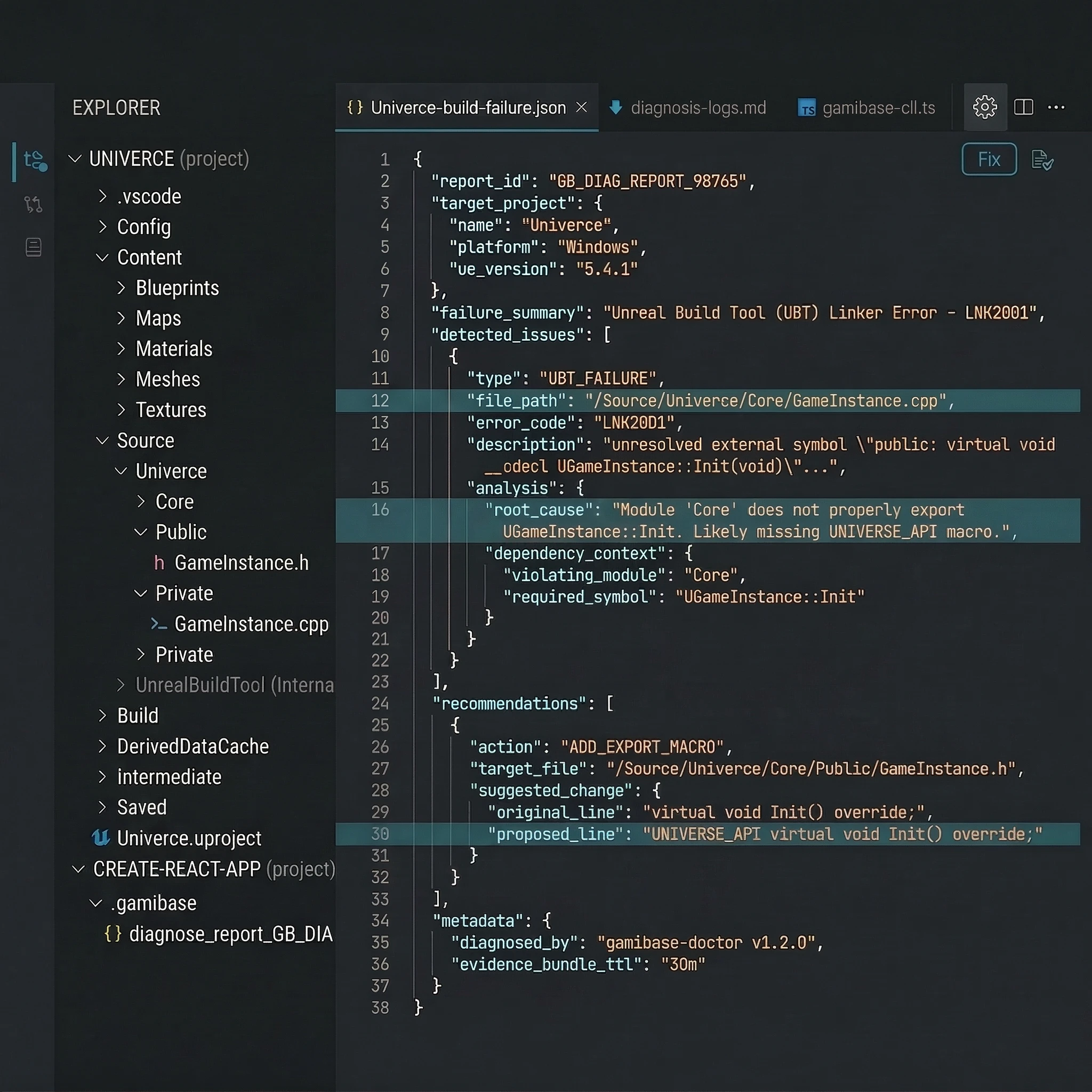
Sharper Unreal workflows, without hiding the rules
Build diagnosis first
Start from failed Unreal builds and move quickly into structured findings, context, and reviewable next steps.
Works across your surfaces
CLI, MCP, VSCode, and CI stay aligned so teams do not relearn the product by surface.
Visible operating rules
Dry-run, preflight, review gates, and fail-closed stops stay legible as workflows get more capable.
Generic tooling can write code. Unreal teams need a workflow layer.
Noisy build failures
UBT and UHT output still makes the actual issue harder to see than it should be for Unreal teams under time pressure.
Project-aware complexity
Modules, targets, config, and engine conventions create workflow context generic tooling rarely carries cleanly.
Too many surfaces
Teams move between terminal, editor, CI, and agent tools. The workflow rules still need to feel consistent.
Trust gap
Automation only earns trust when execution posture, review points, and failure boundaries stay visible to operators.
Use Gamibase from the surfaces teams already work in.
CLI, MCP, VSCode, CI, and the optional UE bridge keep diagnosis, context, and review aligned across working contexts.
Surface role
CLI keeps the workflow closest to the operator.
Terminal-first surface for local runs and CI parity. Clear modes, review checkpoints, and structured output.
Governance that scales without softening the boundaries
Set workflow rules at the organization level so the product stays consistent as more teams, surfaces, and operators come online.
Policy-aware team controls
Set organization-level workflow rules so teams can expand usage without flattening review posture or route boundaries.
Read the docsCommand allow/deny lists
Restrict sensitive routes, require review steps, and keep operator boundaries consistent across teams and surfaces.
Read the docsModel governance
Control which execution paths and approved integrations fit your operating model without weakening the trust model.
Read the docsApproval workflow alignment
Connect higher-impact operator flows to the approval posture your team already expects around sensitive work.
Read the docsSafer workflows only matter if the boundaries stay visible.
Gamibase is built around explicit review, visible execution posture, and fail-closed behavior when the workflow should stop.
Visible workflow posture
Read-only, dry-run, preflight, and deeper follow-through stay easy to tell apart before a workflow asks for more trust.
Review-first by default
Higher-impact steps stay operator-facing and reviewable instead of disappearing behind silent automation language.
Fail-closed when needed
When evidence is stale, scope is unclear, or the workflow should stop, the product denies rather than guessing.
Go deeper on trust and governance.
See the full model for review gates, workflow states, and capability boundaries in one place.
Current coverage snapshot
Concrete counts from the active baseline, surfaced directly from the current product shape.
6
Workflow Tracks
Diagnosis, project reads, automation, review, crash triage, and planning
5
Surface Types
CLI, MCP, VSCode, CI, and the optional UE bridge
20
MCP Routes
Machine-facing routes for integrations, editors, and agents
29
VSCode Commands
VSCode commands in the current extension baseline